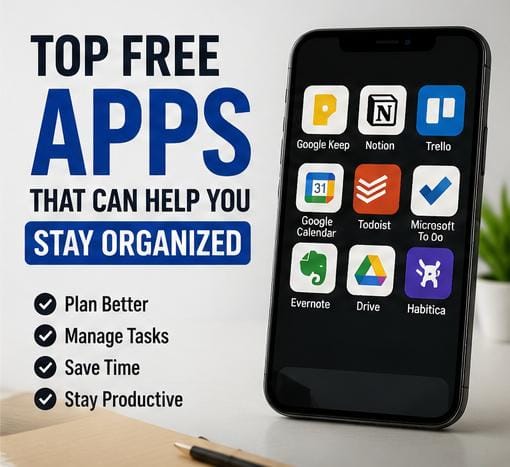
Top Free Apps That Can Help You Stay Organized
Staying organized in today’s fast-moving digital world can make your daily routine feel significantly less stressful and far more productive. Whether you are a student balancing tight assignment deadlines, a remote worker managing client projects, a business owner tracking daily inventory, or someone juggling busy family responsibilities, keeping track of everything in your head is a setup for burnout. Fortunately, leveraging top free apps that can help you stay organized provides a reliable, stress-free system to store your ideas, streamline schedules, and execute tasks efficiently.

You don’t need expensive software subscriptions or complicated corporate tools to keep your life in order. Modern smartphones—both Android and iPhone—come with access to incredible productivity platforms that cost absolutely nothing. When you pair effective organization systems with simple morning habits that make your entire day easier and proven ways to improve focus and concentration, your daily output will skyrocket naturally.
In this detailed review, we explore 10 exceptional free apps that can help you stay organized, break down their key features, and explain how to build a clean routine without feeling overwhelmed.
Table of Contents
Why Staying Organized Matters for Your Mental Health
Organization is not just about having a neat desk or a tidy phone screen; it directly impacts your brain’s cognitive load. When you rely solely on memory to store meeting times, grocery lists, project steps, and bill payment dates, your brain stays in a constant state of low-level anxiety. Utilizing dependable free apps that can help you stay organized allows you to externalize your thoughts, giving your mind space to focus on deep thinking and execution.
Here are key benefits of keeping your schedule organized:
- Drastically Reduced Stress: Eliminates the constant fear of missing important deadlines or forgetting commitments.
- Better Time Allocation: Helps you visualize your free hours clearly so you don’t overcommit or waste time.
- Enhanced Daily Focus: Allows you to execute tasks step-by-step instead of constantly switching priorities.
- Improved Accountability: Tracks your project milestones visually, driving a sense of steady accomplishment.
- Seamless Work-Life Balance: Separates professional tasks from personal errands so you can truly relax during rest hours.
10 Free Apps That Can Help You Stay Organized
1. Google Keep
Google Keep is one of the fastest, most lightweight note-taking applications available. Designed like a digital board of colorful sticky notes, it allows you to capture quick thoughts, record voice memos that automatically transcribe into text, capture photos, and create interactive daily checklists. Because it connects directly to your Google account, your notes sync seamlessly across your phone, tablet, and laptop without any manual setup.

For official downloads and web access, visit Google Keep.
2. Todoist
Todoist is widely recognized as a powerhouse in task management. It uses natural language input, meaning you can simply type “Submit work report every Monday at 9 AM” and the app automatically schedules recurring reminders for you. You can organize tasks by project color, set priority levels (P1 through P4), and track your productivity streaks over time. It is an ideal choice for anyone looking for powerful free apps that can help you stay organized across multiple life areas.
Explore features on the official website: Todoist.
3. Trello
If you process information visually, Trello is an outstanding organization tool. Built around the famous Kanban board method, Trello lets you organize projects into visual columns like “To-Do,” “In Progress,” and “Completed.” You move task cards across columns as you complete your work. It is perfect for managing content calendars, group projects, event planning, and workflow tracking.
Check out visual templates on Trello.
4. Notion
Notion is an all-in-one digital workspace that combines notes, project management, custom databases, and wiki documentation. While it offers advanced customization for power users, beginners can easily start with free templates for habit tracking, daily journals, lesson planning, and budget monitoring. Its flexibility makes it one of the most versatile free apps that can help you stay organized long-term.
Access workspaces directly at Notion.
5. Google Calendar
Mastering your time starts with time-blocking, and Google Calendar is the gold standard for free schedule management. You can color-code your work meetings, personal workouts, meal prep sessions, and family time. Setting up notification alerts ensures you never miss a Zoom call, doctor’s appointment, or project deadline again.
Manage your schedule online at Google Calendar.
6. Microsoft To Do
Microsoft To Do offers a clean, ad-free, and simple task management experience. Its flagship feature, “My Day,” gives you a completely blank slate every single morning, suggesting important tasks from your main lists to help you focus on what truly matters today. It integrates smoothly with Outlook and Windows computers.
Get started at Microsoft To Do.
7. TickTick
TickTick goes beyond standard to-do lists by integrating a built-in Pomodoro timer and habit tracker right inside the app. You can create task lists, set location-based reminders (e.g., reminding you to buy milk when you arrive at the supermarket), and run focus timer sessions directly from your checklist screen.
8. Evernote
Evernote remains a long-time favorite for organizing long-form notes, web articles, scanned documents, and research papers. Its powerful search bar can read hand-written notes within uploaded images, making it an incredible digital filing cabinet for students and researchers managing vast amounts of information.
9. Habitica
If traditional task lists feel boring, Habitica turns your daily organization into an exciting Role-Playing Game (RPG). Completing your real-world to-do items, daily habits, and chores earns your avatar experience points, gold, and armor. Neglecting your daily routine causes your character to lose health points, making productivity genuinely fun!
10. Pocket
Digital clutter often stems from opening dozens of browser tabs that you intend to read later. Pocket allows you to save articles, news reports, and videos with a single click so you can read or listen to them offline later. This keeps your web browser tidy and protects your focus during work hours.
How to Choose the Right Productivity App for Your Lifestyle
With so many fantastic options available, downloading every app at once will quickly create digital confusion. To select the best free apps that can help you stay organized, assess your personal working style:
- For Minimalists: Google Keep or Microsoft To Do offer clean interfaces without distracting menus.
- For Visual Planners: Trello provides an interactive board layout that makes tracking progress effortless.
- For All-In-One Customizers: Notion allows you to build custom dashboards tailored to your exact preferences.
- For Busy Professionals: Combining Google Calendar with Todoist ensures complete control over meetings and task execution.
Essential Tips for Using Productivity Tools Without Stress
An app is simply a tool—it only works as well as the consistency behind it. Follow these practical rules to get the maximum benefit from your organization apps:
1. Stick to the Rule of Two: Avoid using more than two core productivity apps at once (e.g., one calendar app + one task list app). Adding too many tools causes administrative fatigue.
2. Perform a Weekly Reset: Spend 10 minutes every Sunday clearing out completed tasks, updating deadlines, and setting priorities for the upcoming week.
3. Keep Categories Simple: Group your tasks into three clean buckets: Work, Personal, and Urgent. Over-categorizing tasks creates friction when adding quick notes.
For official software security and digital wellness standards, explore resource guides on WHO or health efficiency research on Healthline.
Frequently Asked Questions (FAQ)
Are these organization apps completely free to use?
Yes! All the apps listed in this guide offer robust free tiers that include all essential task management, note-taking, and scheduling features without requiring a credit card.
Will these apps sync between my Android phone and laptop?
Absolutely. Applications like Google Keep, Todoist, Trello, Notion, and Google Calendar sync seamlessly across Android, iOS, Windows, and Mac web browsers.
What is the best app for beginner task management?
Google Keep or Microsoft To Do are the best starting points for beginners because of their straightforward, intuitive interfaces.
Over to You!
Which of these free apps that can help you stay organized are you currently using, or which one do you plan to download today? Do you prefer visual boards like Trello or quick checklist apps like Google Keep? Drop your thoughts in the comment section below—let’s talk productivity!